

Running a creator agency means juggling dozens of compliance obligations at once. Every model on your roster needs verified ID, signed contracts, tax documents, and ongoing consent records. Once you scale past ten or fifteen creators, tracking everything in shared drives or email threads becomes a liability. A compliance portal solves this by centralizing all verification, documentation, and audit workflows in one controlled environment. For OFM agencies operating in 2026, building or adopting the right portal framework is no longer optional.
Why Creator Agencies Need a Compliance Portal
Traditional file storage fails the moment you need to prove compliance under time pressure. Platforms like OnlyFans require agencies to produce identity verification, age verification, and consent documentation on demand. Scattered files mean missed deadlines, duplicated effort, and exposure to serious legal risk.
A compliance portal creates a single source of truth for every model's documentation. It tracks what's current, what's expiring, and what's missing. Version control ensures you always reference the latest signed contract. Access logs show who viewed or updated a file and when. Centralized compliance management reduces the risk of human error and accelerates audits.
Key Functions Every Portal Must Cover
Your compliance portal should handle these core workflows:
- Identity and age verification: Upload and timestamp government-issued ID, selfie verification, and platform-specific checks.
- Contracts and addenda: Store signed agreements, track renewal dates, and flag unsigned models before they go live.
- Tax documentation: Collect W-9 or W-8BEN forms, issue 1099s at year-end, and maintain backup copies.
- Consent and release forms: Document ongoing consent for content use, particularly when repurposing or licensing material.
- Platform compliance exports: Generate audit-ready packages when platforms or legal counsel request proof of compliance.
When you onboard a new model, the portal should automatically trigger a checklist. Missing items block progression until resolved. This enforces discipline across your team and eliminates guesswork.

Designing Your Compliance Portal Architecture
Building a compliance portal starts with understanding your document lifecycle. Most agencies manage three categories: pre-onboarding verification, active contract and tax records, and historical archives for models who've churned or paused.
Pre-onboarding verification includes ID scans, platform age checks, and background screenings. These documents must be timestamped and tamper-proof. Active records are contracts, tax forms, and consent logs that change or renew over time. Historical archives preserve everything for legal retention periods, typically seven years for tax purposes.
Access Control and Permissions
Not every team member needs full access to sensitive documents. Your compliance portal should enforce role-based access control (RBAC). Onboarding coordinators see verification files. Accountants access tax forms. Agency owners and compliance officers hold master access.
Granular permissions prevent accidental deletion or unauthorized sharing. Audit logs track every action. If a model requests their data under privacy regulations, you can produce a complete access history in minutes.
| Role | Permissions | Document Access |
|---|---|---|
| Onboarding Coordinator | Upload, view, request signatures | ID, contracts, consent forms |
| Accountant | View, generate reports | Tax forms, invoices, payout records |
| Compliance Officer | Full access, audit logs, exports | All documents, historical archives |
| Model Manager | View active contracts, content plans | Contracts, content schedules |
This structure ensures compliance best practices while maintaining operational speed. Managers still get the information they need without exposing sensitive tax data or personal identifiers.
Automating Verification and Expiration Alerts
Manual compliance tracking breaks down at scale. When you're managing twenty or thirty models, remembering which contracts expire in Q3 becomes impossible. Automation closes that gap.
Your compliance portal should send expiration alerts for contracts, ID renewals, and platform recertifications. Set reminders thirty, fifteen, and seven days before a document expires. Flag models whose files are incomplete or overdue.
Building Verification Workflows
Verification workflows reduce onboarding bottlenecks. When a new model submits their ID, the portal triggers an automated review process. It checks for:
- Document clarity: Is the ID legible and unaltered?
- Expiration date: Does the ID remain valid for at least six months?
- Platform cross-check: Does the name match the creator's platform profile?
- Selfie verification: Does the selfie match the ID photo?
If any check fails, the system flags the issue and notifies the onboarding team. The model receives clear instructions on what to resubmit. This eliminates back-and-forth emails and speeds up time-to-revenue.
Automated workflows also enforce sequencing. A model cannot sign their contract until ID verification is complete. They cannot receive their first payout until tax forms are on file. Compliance workflow best practices emphasize prevention over correction.

Integrating Tax and Payout Compliance
Tax compliance is where most creator agencies face the steepest learning curve. Every model working under a management agreement requires proper tax classification. Domestic U.S. creators typically receive 1099-NEC forms. International creators need W-8BEN documentation to avoid backup withholding.
Your compliance portal should store all tax forms in a secure, encrypted section. It should link directly to your payout workflows so that no payment processes without a valid tax form on file.
End-of-Year Tax Reporting
When January arrives, you'll need to generate 1099 forms for every model who earned over $600 in the previous year. A well-designed compliance portal automates this:
- Pull total earnings from your invoicing or payroll module.
- Match each model to their stored W-9 or W-8BEN.
- Generate 1099-NEC forms with correct TIN or EIN data.
- File electronically with the IRS and send copies to models by January 31.
- Archive confirmation of filing in each model's compliance record.
This process eliminates manual spreadsheet reconciliation and reduces errors. It also creates an audit trail that proves you fulfilled your tax obligations. For agencies managing commission structures across dozens of creators, automation is the only scalable path.
Maintaining Audit-Ready Documentation
Platforms, payment processors, and state regulators may request compliance documentation with little notice. An audit-ready compliance portal means you can produce the required files in hours, not days or weeks.
Audit readiness requires three things: completeness, organization, and accessibility. Every model should have a complete file. Documents should follow a consistent naming convention and folder structure. You should be able to export a full compliance package as a PDF or ZIP file on demand.
Creating Compliance Export Packages
Many agencies build standardized export templates for common audit scenarios. Examples include:
- Platform compliance audit: All active model IDs, contracts, and consent forms in one package.
- Tax authority request: W-9/W-8BEN forms, 1099 copies, and payout summaries for a given tax year.
- Legal discovery: Complete file for a specific model, including all amendments, addenda, and correspondence.
Your compliance portal should allow you to generate these packages with a few clicks. Compliance document portals emphasize features like version tracking and expiration alerts to ensure every export contains current, valid files.
| Audit Scenario | Required Documents | Export Format | Typical Turnaround |
|---|---|---|---|
| Platform Compliance | ID, contracts, consent forms | PDF package | 24-48 hours |
| Tax Authority | W-9/W-8BEN, 1099, payout logs | Spreadsheet + PDFs | 5-7 business days |
| Legal Discovery | All model files, communications | Searchable ZIP archive | 10-14 business days |
| Payment Processor Review | Contracts, compliance checklist, ID verification | PDF package + certification letter | 48-72 hours |
Having these templates ready shortens response times and demonstrates professionalism. It also reduces the risk that you'll miss a document under pressure.
Linking Compliance to Operational Dashboards
Compliance data shouldn't live in isolation. The most effective compliance portals integrate with your broader agency management software to surface alerts where your team already works.
For example, when a contract approaches expiration, the model's dashboard should display a warning banner. When a manager reviews a model's performance, they should see compliance status at a glance: green for current, yellow for expiring soon, red for overdue.
Dashboard Integration Points
Key integration points include:
- Model profiles: Display compliance status badge (verified, pending, expired).
- Onboarding pipeline: Block progression until all verification steps are complete.
- Payout queue: Flag models with missing or expired tax forms before processing payments.
- Content planning: Link compliance records to content plans to ensure consent is documented for every piece.
- Staff notifications: Alert managers when their assigned models have compliance issues.
BIGROS was built to handle exactly this use case. By centralizing compliance alongside onboarding, invoicing, and payroll, it ensures your team never loses track of what matters. When compliance is built into your daily workflow rather than treated as a separate task, completion rates soar and risk drops.

Self-Service Portals for Models
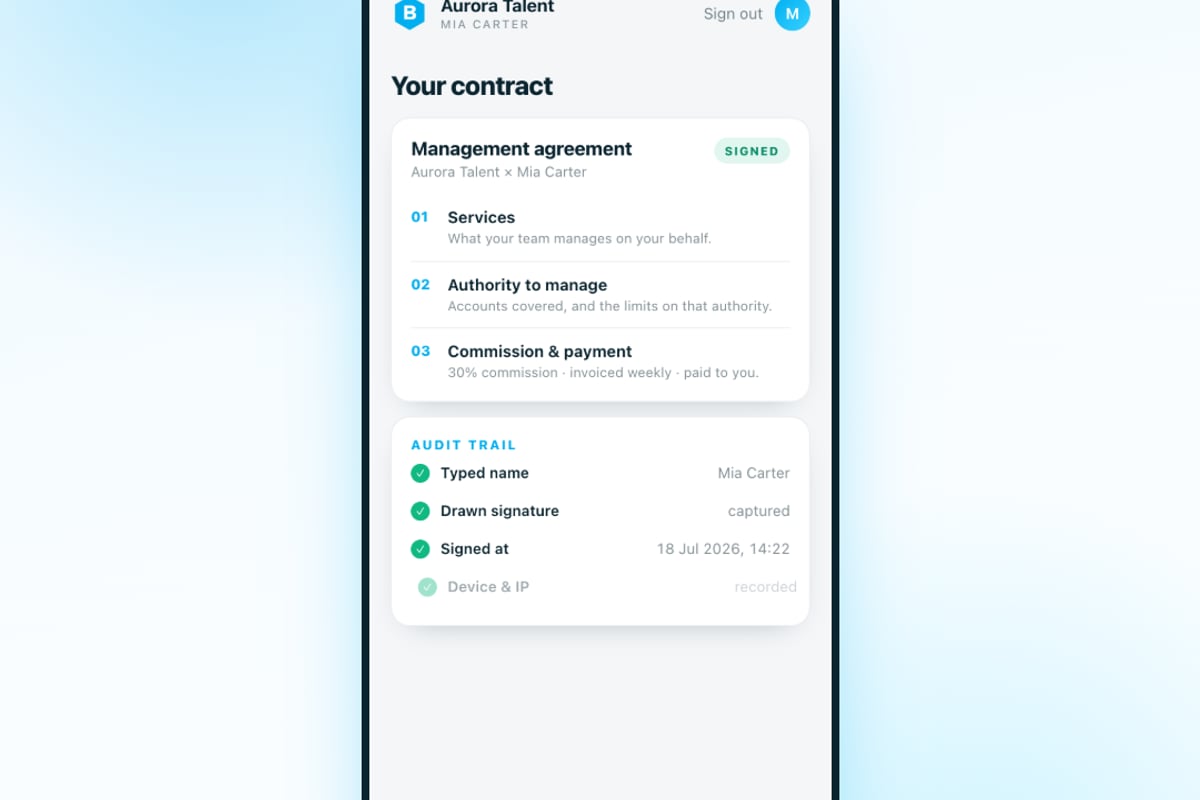
Many agencies give models limited access to their own compliance records through a self-service portal. This reduces support requests and empowers creators to take ownership of their documentation.
A model-facing portal typically allows:
- View current contracts and tax forms without requesting copies from your team.
- Upload updated documents when ID or tax status changes.
- Track onboarding progress and see what's missing before they can go live.
- Download copies of 1099 forms at tax time.
Self-service portals must balance access with security. Models should never see other creators' files. They should be able to download their own documents but not delete or alter historical records. Supplier self-service portal setup principles apply directly to creator management: clear boundaries, secure authentication, and version control.
Common Compliance Portal Pitfalls
Even well-intentioned portals can fail if you overlook key details. Here are the most common mistakes:
Pitfall One: Poor Document Naming Conventions
When files are named "IMG_1234.jpg" or "Contract Final FINAL v3.pdf," finding the right version becomes a nightmare. Enforce a naming standard: ModelLastName_FirstName_DocumentType_Date.pdf. Automation can rename files on upload.
Pitfall Two: No Retention Policy
Keeping every file forever creates clutter and increases storage costs. Define a retention policy: active model files stay live, churned model files move to archive after ninety days, historical files delete after seven years unless flagged for legal hold.
Pitfall Three: Ignoring Mobile Access
Managers and models often need to upload or review documents from their phones. If your compliance portal isn't mobile-responsive, you'll see lower completion rates and more support tickets. Test every workflow on iOS and Android before launch.
Pitfall Four: Weak Encryption and Backup
Compliance documents contain personally identifiable information (PII) and financial data. Encrypt files at rest and in transit. Maintain encrypted backups in a separate geographic region. Test your disaster recovery process at least once per quarter.
Scaling Compliance as You Grow
When you're managing five or ten models, you can track compliance in a spreadsheet. At twenty models, that breaks. At fifty, it's a legal liability. Your compliance portal must scale with your roster.
Scaling compliance means more than just storage capacity. It means faster onboarding, automated renewals, and real-time visibility. It means your compliance officer can review a hundred model files in an hour instead of a week.
As you scale your agency, your compliance portal should support bulk actions: bulk exports, bulk reminders, bulk renewals. It should surface trends: which documents expire most often, which models take longest to onboard, which team members have the highest error rates.
Analytics turn compliance from a cost center into a strategic advantage. When you know your average time-to-compliance is twelve days, you can set a goal to reduce it to eight. When you know 40% of delays come from missing tax forms, you can redesign that step in your onboarding flow.
Frequently Asked Questions
What's the difference between a compliance portal and a shared drive?
A shared drive stores files. A compliance portal manages workflows, enforces access control, sends expiration alerts, and generates audit reports. It's the difference between a filing cabinet and a compliance engine.
How long should we retain compliance documents?
Tax documents require seven-year retention under IRS guidelines. Contracts and ID verification should be kept for the duration of the relationship plus seven years. Consent forms should be retained indefinitely if content remains online.
Can we build a compliance portal in-house or should we buy software?
Small agencies with technical resources may build custom solutions. Most agencies save time and reduce risk by adopting purpose-built software. The compliance framework, encryption, and audit logging are complex to get right. For creator agencies specifically, BIGROS offers a compliance portal as part of a complete operating system.
Choosing the Right Compliance Portal for Your Agency
Not all compliance portals are built for creator agencies. General-purpose document management systems lack the verification workflows, consent tracking, and platform-specific compliance features you need.
When evaluating options, prioritize:
- Creator-specific workflows: ID verification, consent documentation, platform compliance exports.
- Payout integration: Link tax forms directly to payout systems to block payments when documentation is incomplete.
- Mobile-first design: Models and managers need access from any device.
- Audit-ready exports: One-click generation of compliance packages for platforms or legal requests.
- Role-based access: Granular permissions for onboarding teams, accountants, managers, and compliance officers.
The right compliance portal doesn't just reduce risk. It accelerates onboarding, improves model retention, and frees your team to focus on revenue-generating work. When compliance becomes invisible infrastructure rather than a bottleneck, your agency can scale confidently. For a detailed framework on maintaining compliance across your roster, review the OFM agency compliance checklist and consider how contract management ties into your overall compliance strategy.
A compliance portal transforms scattered documentation into a structured, audit-ready system that scales with your roster. By centralizing verification, automating alerts, and integrating compliance into daily workflows, you reduce risk and accelerate growth. BIGROS gives creator agencies a purpose-built compliance portal alongside tools for onboarding, payroll, invoicing, and live P&L, so you can run your entire operation from one screen.